[Linux] HTTPS (HTTP Secure), openssl
✔️ HTTPS (HTTP Secure)란 ?
HTTP protocol의 암호화된 버전이다.
HTTPS를 사용하는 기술적인 이유는 HTTP는 통신 시 데이터를 평문으로 주고 받는데 HTTPS를 사용하면 통신 데이터가 암호화되어 내용을 읽을 수 없으므로 보안적인 측면에서 사용을 권장한다.
- SSL (Secure Socket Layer) - 넷스케이프사에서 개발한 인터넷 보안 프로토콜
- TLS (Transport Layer Security) - SSL 이 표준화 되면서 바뀐 이름
HTTPS를 적용하려면 키와 인증서를 발급해야한다.
키를 발급받는 것은 인증서를 키로 암호화해서 안전하게 보관하기 위해서다.
✔️ HTTPS 암호화 방식 (웹 사이트 <-> 인증기관)
- 인터넷 사이트는 자신의 정보와 공개키를 인증기관(CA)에 제출한다.
- 인증기관은 제출된 데이터 검증절차를 거쳐 개인키로 사이트에서 제출한 정보를 암호화한다 ➡ 인증서 발급
- 인증기관은 웹 브라우저에게 자신의 공개키를 제공한다.

사용자가 사이트에 접속할 경우 그 다음 상황은 ?
- 사용자가 사이트에 접속하면 자신의 인증서를 웹 브라우저에게 보낸다.
- 웹브라우저는 미리 받았던 인증기관의 공개키로 인증서를 해독하여 검증한다. 그러면 사이트의 정보와 사이트의 공개키를 알 수 있게 된다.
- 이렇게 얻은 사이트 공개키로 대칭키를 암호화해서 다시 사이트에 보낸다.
- 사이트는 개인키로 암호문을 해독해 대칭키를 얻게 되고, 이제 대칭키로 데이터를 주고받을 수 있게 된다.
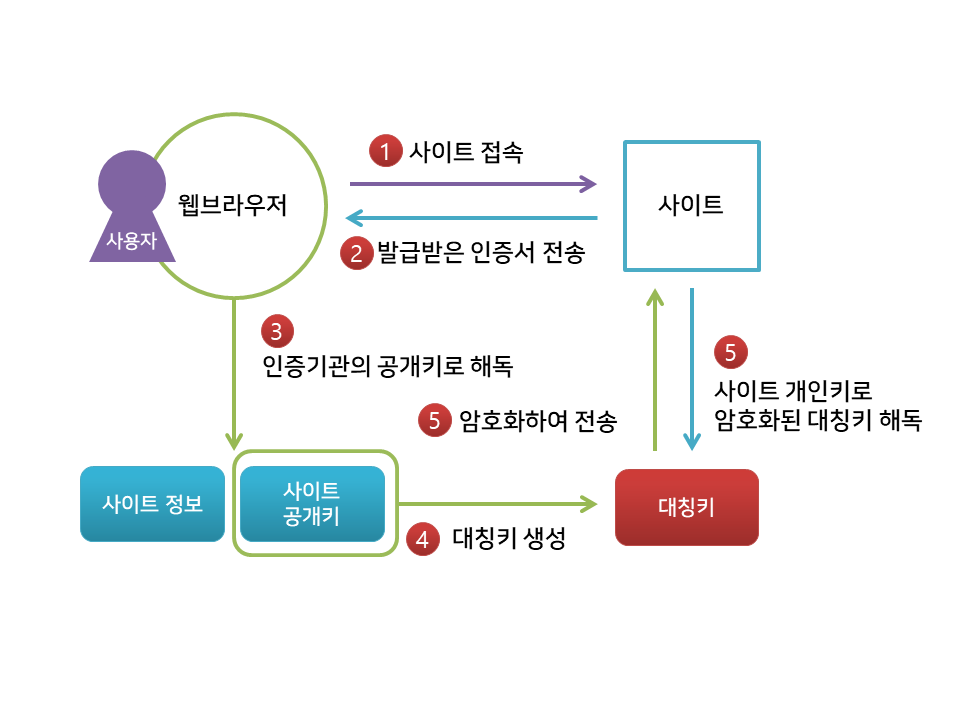

✔️ HTTPS 암호화 방식 (클라이언트 <-> 서버)
1. 클라이언트 → 서버로 랜덤 데이터와 사용 가능한 암호화 방식을 보낸다.
2. 서버 → 클라이언트로 랜덤 데이터, 사용할 암호화 방식과 SSL 인증서를 보낸다.
3. 클라이언트는 서버에게 받은 인증서의 CA가 자신이 들고 있는 CA 리스트에 있는지 확인하고, 있다면 CA의 공개키로 복호화한다. 이는 곧 CA 비밀키에 의해 암호화됐다는 것이므로 인증서의 신원을 보증해준다. (공개키 암호화 방식)
4. 클라이언트는 자기가 보낸 랜덤 데이터와 서버로부터 받은 랜덤 데이터를 조합하여 임시 키 (pre master secret key)를 만든다.
5. 만들어진 임시 키를 인증서의 공개키로 암호화하여 서버에게 보낸다.
6. 서버는 자신이 들고 있던 비밀키로 임시 키를 복호화한다.
7. 이로써 클라이언트와 서버는 동일한 임시 키를 공유하게 되는데, 일련의 과정을 거쳐 master secret 값을 만들고 세션 키를 생성한다.
8. 이렇게 만들어진 세션 키로 암호화된 데이터를 주고받는다. (대칭키 암호화 방식)
9. 세션이 종료되면 클라이언트와 서버 모두 세션 키를 폐기한다.
✔️ HTTPS 구성
SSL/TLS 지원 활성화를 위해 확장 모듈을 설치
mod_ssd 패키지 설치
[root@server ~]# yum install mod_ssl
[root@server ~]# rpm -qa | grep ssl
openssl-1.0.2k-19.el7.x86_64
xmlsec1-openssl-1.2.20-7.el7_4.x86_64
python-backports-ssl_match_hostname-3.5.0.1-1.el7.noarch
openssl-libs-1.0.2k-19.el7.x86_64
mod_ssl-2.4.6-95.el7.centos.x86_64
443/TCP에서 대기하는 기본 가상 호스트에 대해 httpd를 자동으로 활성화
[root@server ~]# systemctl start httpd
[root@server ~]# systemctl enable httpd
[root@server ~]# firewall-cmd --list-service
dhcpv6-client http ssh
[root@server ~]# firewall-cmd --add-service=https
success
[root@server ~]# firewall-cmd --list-service
dhcpv6-client http https ssh

[root@server ~]# systemctl restart httpd
/etc/httpd/conf.d/ssl.conf
| Listen 443 https # 443 https 를 사용함 SSLPassPhraseDialog exec:/usr/libexec/httpd-ssl-pass-dialog # passphrase를 검색할 프로그램 지정 SSLSessionCache shmcb:/run/httpd/sslcache(512000) SSLSessionCacheTimeout 300 SSLRandomSeed startup file:/dev/urandom 256 SSLRandomSeed connect builtin SSLCryptoDevice builtin <VirtualHost_default_:443> # 가상 호스트 정의 ErrorLog logs/ssl_error_log TransferLog logs/ssl_access_log LogLevel warn SSLEngine on # TLS 의 사용여부 SSLProtocol all -SSLv2 # httpd가 클라이언트와통신할 프로토콜 목록 SSLCipherSuite HIGH:MEDIUM:!aNULL:!MD5 # httpd가 사용할암호화 나열 SSLCertificateFile /etc/pki/tls/certs/localhost.crt # 가상 호스트의 인증서 위치 SSLCertificateKeyFile /etc/pki/tls/private/localhost.key # 가상 호스트의 개인 키 위치 CustomLog logs/ssl_request_log \ "%t %h %{SSL_PROTOCOL}x %{SSL_CIPHER}x \"%r\" %b" </VirtualHost> |
✔️ openssl
SSL과 TLS를 구현한 라이브러리 중 하나가 OpenSSL이며 오픈 소스로 구현되어 있다.
OpenSSL 라이브러리는 통신 전문을 암호화 하는 것은 물론 문서를 암호화 할 수 있다.
[root@server conf.d]# pwd
/etc/httpd/conf.d
[root@server conf.d]# ls
00-vhost0.conf  02-vhost2.conf  fcgid.conf   README    userdir.conf
01-vhost1.conf  autoindex.conf  manual.conf  ssl.conf  welcome.conf
SSL 호스트에서 사용할 RSA public, private key 생성
[root@server conf.d]# openssl genrsa -out private.key 2048
Generating RSA private key, 2048 bit long modulus
.........+++
..................................................................+++
e is 65537 (0x10001)

# private.key 생성 완료
[root@server conf.d]# ls
00-vhost0.conf  autoindex.conf  private.key  userdir.conf
01-vhost1.conf  fcgid.conf      README       welcome.conf
02-vhost2.conf  manual.conf     ssl.conf
인증서(CSR) 생성하기
[root@server conf.d]# openssl req -new -key private.key -out test.csr # 발급 신청서 작성
You are about to be asked to enter information that will be incorporated
into your certificate request.
What you are about to enter is what is called a Distinguished Name or a DN.
There are quite a few fields but you can leave some blank
For some fields there will be a default value,
If you enter '.', the field will be left blank.
-----
Country Name (2 letter code) [XX]:kr
State or Province Name (full name) []:admin
Locality Name (eg, city) [Default City]:seoul
Organization Name (eg, company) [Default Company Ltd]:seoul
Organizational Unit Name (eg, section) []:adm
Common Name (eg, your name or your server's hostname) []:server.test.example.com
Email Address []:admin@test.example.com

Please enter the following 'extra' attributes
to be sent with your certificate request
A challenge password []:
An optional company name []:
키와 인증서를 합친다.
[root@server conf.d]# openssl x509 -req -signkey private.key -in test.csr -out test.crt
Signature ok
subject=/C=kr/ST=admin/L=seoul/O=adm/OU=adm/CN=server.test.example.com/emailAddress=admin@test.example.com
Getting Private key
crs, crt, key 파일 디렉터리 변경 및 SELinux 설정
/etc/pki/tls/private/keyname.key : 개인 키 600 또는 400 사용권한과 cert_t로 유지
/etc/pki/tls/certs/certname.csr : 서명 요청할 때만 생성, CA로 보내는 파일(서명용)
/etc/pki/tls/cert/cretname.crt : 공개 인증서, 자체 서명된 인증서가 요청될 때만 생성 서명 요청이 있고 CA로 전송될 때 CA에서 반환되는 파일 644 cert_t로 유지
[root@server conf.d]# ls -l private.key test.csr test.crt
-rw-r--r--. 1 root root 1679 Mar 11 20:35 private.key
-rw-r--r--. 1 root root 1322 Mar 11 20:39 test.crt
-rw-r--r--. 1 root root 1062 Mar 11 20:39 test.csr
[root@server conf.d]# chmod 600 private.key test.crt
[root@server conf.d]# ls -l private.key test.csr test.crt
-rw-------. 1 root root 1679 Mar 11 20:35 private.key
-rw-------. 1 root root 1322 Mar 11 20:39 test.crt
-rw-r--r--. 1 root root 1062 Mar 11 20:39 test.csr
[root@server conf.d]# mv test.c* /etc/pki/tls/certs/
[root@server conf.d]# mv private.key /etc/pki/tls/private/

[root@server conf.d]# systemctl restart httpd
서비스 상태와 포트 점검
[root@server etc]# netstat -natlp | grep httpd
tcp6       0      0 :::80                   :::*                    LISTEN      1472/httpd
tcp6       0      0 :::443                  :::*                    LISTEN      1472/httpd
[root@server etc]# lsof -i tcp:443
COMMAND  PID   USER   FD   TYPE DEVICE SIZE/OFF NODE NAME
httpd   1472   root    6u  IPv6  28871      0t0  TCP *:https (LISTEN)
httpd   1513 apache    6u  IPv6  28871      0t0  TCP *:https (LISTEN)
httpd   1514 apache    6u  IPv6  28871      0t0  TCP *:https (LISTEN)
httpd   1515 apache    6u  IPv6  28871      0t0  TCP *:https (LISTEN)
httpd   1525 apache    6u  IPv6  28871      0t0  TCP *:https (LISTEN)
httpd   1527 apache    6u  IPv6  28871      0t0  TCP *:https (LISTEN)
httpd   1529 apache    6u  IPv6  28871      0t0  TCP *:https (LISTEN)
Advanced

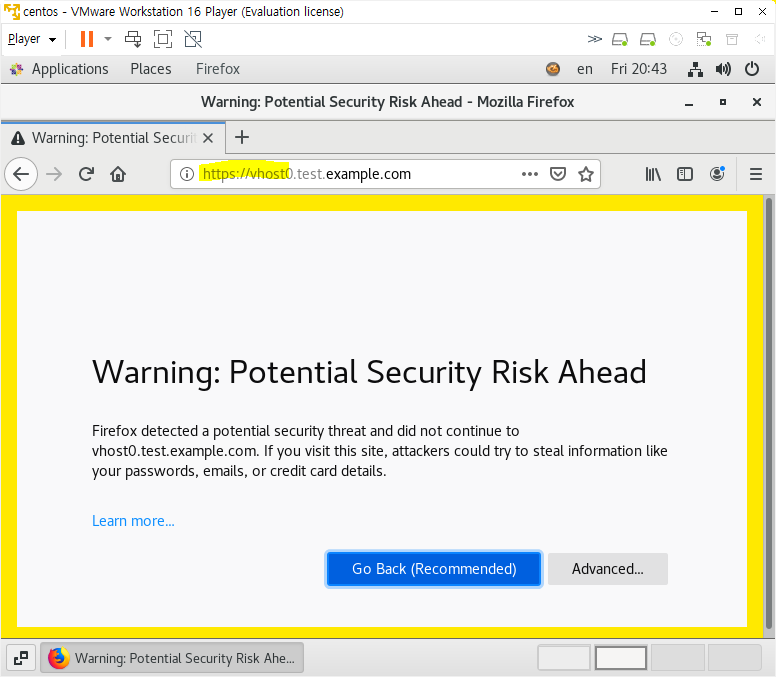

가상 호스트가 먹히지 않는다.
가상 호스트가 작동하도록 호스트파일에 반영해줘야 한다.

🔗 참고